Meet the Structure Agent: messy page in, clear structure out
A new agent in the Agent Store turns meeting notes, pasted emails and brain dumps into headings, lists and tables, keeping every fact. You compare it with your page, and nothing changes until you click Replace.
Every wiki has them: the page that started as quick meeting notes, the email someone pasted in "for now", the brain dump that was going to be cleaned up later. The knowledge is in there. Finding it means reading the whole thing.
Today we're adding the Structure Agent to the Agent Store. Turn it on, open a messy page, click Structure this page, and you get the same content back, organised.
What it does
It reads the page and reorganises it the way you would if you had the time:
- Headings that group what belongs together, with the most important things first.
- Lists for steps and enumerations.
- Tables when items share the same attributes: who owns what, dates and deadlines, plans and prices.
- An Other notes section for loose ends, so nothing falls off the page.
What it doesn't do matters just as much. It keeps every fact, number, date, name and link. It keeps your wording wherever it works. It adds nothing: no opinions, no advice, no filler. And it writes in the language of the page.
A note like this:
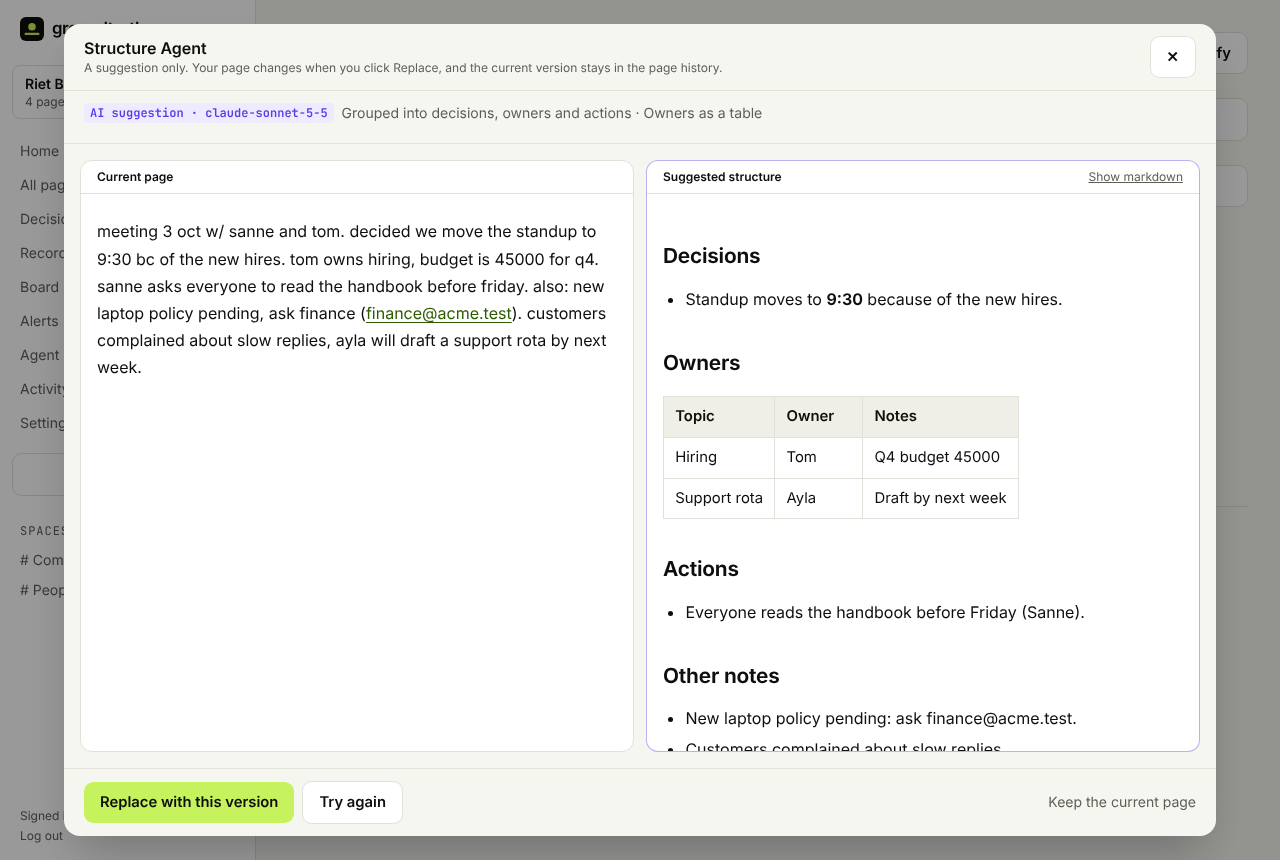
meeting 3 oct w/ sanne and tom. decided we move the standup to 9:30 bc of the new hires. tom owns hiring, budget is 45000 for q4. sanne asks everyone to read the handbook before friday. also: new laptop policy pending, ask finance. customers complained about slow replies, ayla will draft a support rota by next week.
comes back as a page with Decisions (the standup moves to 9:30), Owners (a small table: hiring to Tom with the Q4 budget, the support rota to Ayla), Actions (read the handbook before Friday) and Other notes (the laptop policy, the customer complaints). The screenshot above shows that example.
You stay in charge
The Structure Agent suggests. It never saves anything by itself.
- You see both versions side by side: your current page and the suggestion (on a phone, as two tabs). The suggestion is labelled as AI, with the model that wrote it, and a few notes on what it reorganised.
- It tells you if something might be missing. Before you see the suggestion, Groundtruth checks it against your page for every number, date, email address and link. Anything missing is listed in a warning, so a dropped deadline can't slip through unnoticed. It also warns you if the suggestion is much shorter than the original.
- You decide. Replace with this version swaps it in. Try again asks for a new suggestion. Keep the current page closes it.
- You can always go back. The old version stays in the page history, one click to restore. The activity log records that you accepted a Structure Agent suggestion and which model wrote it. And if someone edits the page while you're looking at a suggestion, Replace refuses instead of overwriting their work.
A cheaper model is fine here
In our guide to which AI model to use, structuring is the textbook job for a mid-size model: it follows instructions closely and costs a fraction of the best ones. So the Structure Agent has its own model setting, separate from your workspace's:
| Setting | Claude | OpenAI | Gemini |
|---|---|---|---|
| All-round (default) | Claude Sonnet 5.5 | GPT-6.1 Sol | Gemini 3.8 Flash |
| Cheapest | Claude Haiku 5.5 | GPT-6 Luna | Gemini 3.5 Flash-Lite |
| Same as workspace | whatever you picked in Settings → AI in the app |
It uses your workspace's own key and supplier; only the model changes. So you can keep a top model for contracts and writing, and let the Structure Agent run on something cheaper. Structuring a typical 1,000-word page costs about two cents on Claude Sonnet or GPT Sol, under a cent on Gemini Flash, and about a tenth of a cent on the cheapest models. No key yet? It runs on your free AI credit.
Try it
- Open the Agent Store in your workspace and install the Structure Agent.
- Pick its model under Settings, or keep the default.
- Open your messiest page and click Structure this page.
It works on pages from 15 words up to about 30,000 characters (a long document; split anything bigger first). It's for people in the app: agents connected over MCP keep writing with their own model.
Don't have a workspace yet? Sign up free and try it on the notes from your last meeting.